Saturday, 31 December 2016

Configure HMC in Hybris

Check if HMC extension is configured
  • log into http://localhost:9001/ using admin credentials
  • Under Platform--> Initialization, I initialized to recreate the new tables.
Apart from the above, I did not do any other steps. I noticed that the extensions under HMC in Platform-->Extension, are all marked as X. Please refer to the attached image.
You are missing the hmc as part of your localextensions.xml file. you can locate the xml from this path "F:\Hybris\HYBRIS6\hybris\config\localextension.xml".
Sample localextension.xml file
        <!-- ext-template -->
<extension name="yempty" />
<extension name="yhacext" />
<extension name="admincockpit" />
<extension name="backoffice" />
<extension name="cockpit" />
<extension name="hmc" />
<extension name="platformhmc" />
<extension name='mcc' />
<extension name='commercesearchbackoffice' />
<extension name='commerceservicesbackoffice' />
<extension name='solrfacetsearchbackoffice' />
<extension name='solrserver' />
<extension name='yacceleratorcockpits' />
<extension name='yacceleratorinitialdata' />
<extension name='yacceleratorfulfilmentprocess' />
<extension name='yacceleratorstorefront' />
<extension name='yaddon' />
<extension name='ycommercewebservices' />
<extension name='electronicsstore' />
<extension name='apparelstore' />
<extension name='liveeditaddon' />
<extension name='acceleratorwebservicesaddon' />
After adding the hmc extension you have to run an update running system from the HAC (or re-initialize).

Installing Hybris 6

Hybris Installation
Follow below instruction to insall Hybris environment.
  1. Download JDk 8 from here
  • Accept licence terms and conitions.
  • Download as per your windows bit (32 or 64)
  • Once downloaded, install jdk by double clicking it. Follow the default instructions by clicking next.
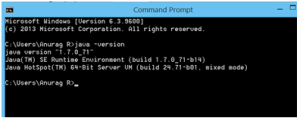
  • Once installed, you should can verify installation in command prompt.
  • setant
  • Download the Hybris  from here.

Saturday, 10 December 2016

Creating an Adobe Experience Manager HTL Headline component

You can create an Adobe Experience Manager (AEM) Headline component that you can use in your AEM web page. A headline component lets your website visitors read latest headlines about a specific subject. That is, you can enter keyword into an AEM dialog and the component will display headlines related to the keyword. For example, you can enter Facebook keyword and the component displays headlines, as shown in the following illustration.

Monday, 5 December 2016

AEM Forms vs AEM out-of-box Form Component

AEM Forms vs AEM out-of-box Form Component 
It depends on your use case, if you have one or two simple forms where you want to capture 5 fields of information then the OOTB forms would suffice.  However if you have this requirement, moderately complex, and/or complex forms then AEM Forms would be a better solution.  Here are some of the details as to why I make this statement:
1)  Form model capabilities - being able to bind a form to a schema or XDP form for ease of back end integration
2) Rule builder as an example of being able to add logic to a form without the requirement of scripting including access to web services
3) Document of record - in many cases upon submission of data there is a desire to create an archive of the submission, AEM Forms can create PDF and PDF/A documents by utilizing OOTB services and either no or little coding
4) If you have a need for adding attachments to the form and using them as part of archive or welcome kit - AEM Forms OOTB can convert other document types to PDF and then combine these documents together along with page numbering, table of contents, bookmarks ect....
5) Batch capabilities - perhaps you have a requirement to merge data onto a template and produce print output that's directed to printer or bulk PDF creation
6) OOTB correspondence management capabilities to manage documents such as contracts
7) A much richer set of components that come OOTB to ensure the best possible user experience
8) One click Marketing Cloud integration - easily add in Analytics, Adobe Sign, Target using the built in Forms Manager
9) Sophisticate form capabilities such as form fragments, form sets, lazy loading - these all ensure ease of form authoring and ensure a high performing user experience
10) Forms Manager to manage all your forms - dictionary translation, initiate review and comment, find relationships between forms and form fragments ect....

Sunday, 4 December 2016

Sling Dynamic Include

The purpose of the sling dynamic include (SDI) is to replace dynamic generated components (eg. current time or foreign exchange rates) with server-side include tag (eg. SSI or ESI). Therefore the dispatcher is able to cache the whole page but dynamic components are generated and included with every request. Components to include are chosen in filter configuration using resourceType attribute.
When the filter intercepts request for a component with given resourceType, it'll return a server-side include tag (eg. <!--#include virtual="/path/to/resource" --> for Apache server). However the path is extended by new selector (nocache by default). This is required because filter has to know when to return actual content.
Components don't have to be modified in order to use this module (or even aware of its existence). It's servlet filter, installed as an OSGi bundle and it can be enabled, disabled or reconfigured without touching AEM installation.
Let's try ☺
Lets do this practically by loading a component with and without SDI.