Saturday, 12 December 2015

Asset Grabber – oEmbed a complete asset embed solution

If you are an AEM/CQ developer and had worked on multiple projects, then you might be very well familiar with how exasperating is to create components for embedding assets in for web page. Here’s how actually it goes from development perspective.
Things starts with video component. Now create a component for YouTube, let’s assume you created. Next day client knock’s your door and say’s, “We are now planning to embed Vimeo also, please add this into your requirement and start working“. Somehow you managed to create a Vimeo component. After 2 days, client again shoots a missile, “We had an internal discussion and now we are planning to feature Ted videos as well, please get started“. At this point what development team and with  how much anger they get into you will be aware, But before leaving for the day you run this command: “project XYZ: Completed Ted Video module“. It means you have completed this as well.
When it comes to assets, it’s very strenuous to take care of all scenarios. Let me introduce youoEmbed, we call it as “Assets Grabber”. Yes, you heard right, it’s having secret magnetic attraction power to pull things from other sites and show in yours. That’s so called secret magnetic attraction is it’s ability to handle and support huge amount of sites starting from Vimeo, YouTube for videos to Flickr for images to Infogram for charts to Slideshare for slide to Meetup for meetings.

Sunday, 6 December 2015

Query Builder

Search is always the backbone of many functionalities in an AEM application . It becomes quite critical in Business scenarios to implement the most Optimized Query which fetches the best possible result. To perform search in AEM , Query Builder is highly recommended over simple SQL / XPATH query statements. The Query Builder , if used correctly, will solve all your query implementations and would be a handy way to Optimize your queries for better performance of the page. Through this Blogpost , I would explain the basics of Query builder and then would go to advanced concepts , focusing at each point how you may create any search scenario to Query Builder Predicate form. I hope this post will solve all your Search performances related hurdles in AEM.

What is Query Builder?

Query Builder is an API which can be used to create Search queries in JAVA content repository. It is extensible tool by which you may add/remove various predicates in a query using this API. The best way to create predicates is using the Query Builder Debugging Tool : /libs/cq/search/content/querydebug.html . Try to implement your Business use case in the Predicate form using this debugger, Optimize the query and then implement it in the code.

Creating Adobe CQ OSGi bundles that use the Query Builder API

Discusses how to create an OSGi bundle that contains the AEM Query Builder API. This OSGi operation contains application logic to search the AEM repository. This article also discusses how to create a web page that invokes an operation exposed by the OSGi bundle and display the results in a grid control.    
This article uses an Adobe Maven Archetype project to build an OSGi bundle. If you are not familiar with an Adobe Maven Archetype project, it is recommended that you read the following article: Creating your first AEM Service using an Adobe Maven Archetype project.
This article has been updated to replace the use of a SlingRepository instance with a ResourceResolverFactory instance. TheResourceResolverFactory is used to create a Session instance that is required to use the AEM Query Builder API. Now a Session instance is created by using the adaptTo method:
resourceResolver.adaptTo(Session.class);
This article has been updated to use this Maven command to build the OSGi bundle:
mvn archetype:generate -DarchetypeRepository=https://repo.adobe.com/nexus/content/groups/public/ -DarchetypeGroupId=com.day.jcr.vault -DarchetypeArtifactId=multimodule-content-package-archetype -DarchetypeVersion=1.0.2 -DgroupId=custom.querybuilder -DartifactId=querybuilder -Dversion=1.0-SNAPSHOT -Dpackage=custom.querybuilder -DappsFolderName=myproject -DartifactName="My Project" -DcqVersion="5.6.1" -DpackageGroup="My Company"

cq5-querybuilder-adapttoberlin


Read More >>

Content Finder - Query Builder

Use QueryBuilder HTTP API syntax to drive ContentFinder queries instead of more restrictive GQL.
How to Use
  • Install the ACS AEM Commons package
  • Create a new Content Finder Tab JS file
  • Update the contentfindertab config JS object to include:
    • url: “/bin/wcm/contentfinder/qb/view.json”
    • baseParams: { .. }
      • JS object representing the QueryBuilder API key/value pairs used to drive all of the ContentFinder Tab’s queries
      • If no baseParams are set then the suggestField will populate the query param
    • getParams: { .. }
      • JS object representing the dynamic QueryBuilder API key/value pairs used to drive all of the ContentFinder Tab’s queries (baseParams will be used in conjunction with these)

Query Builder samples

AEM comes with a Query Debugger tool at:
/libs/cq/search/content/querydebug.html
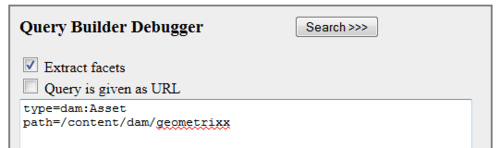
You can execute search queries on the JCR (Java Content Repository) using this tool.  For example, to search for all DAM assets in /content/dam/geometrixx, execute the following query:
type=dam:Asset
path=/content/dam/geometrixx
See screenshot below:
image
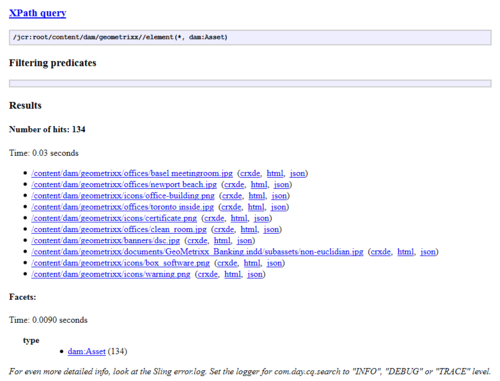
Running this search query should produce a result such as follows:
image
You can execute more complicated search queries as well.  For example, to search for all DAM assets in /content/dam/geometrixx with the string “.png” in the node name and to to sort the results in the descending order of when the node was last modified, execute the following query:
type=dam:Asset
path=/content/dam/geometrixx
nodename=*.png
orderby=@jcr:content/jcr:lastModified
orderby.sort=desc
More information here.  Excellent blog entry by Thomas Joseph on Oak indexes here.
Other examples:
How many audit events have accumulated:
type=cq:AuditEvent
path=/var/audit
How many unique users have logged in to AEM in the past 12 hours?
A user who has logged in from three different IP addresses (home office, work, mobile phone) will be counted three times.
type=rep:Token
path=/home/users
How many web pages are in the AEM system?
type=cq:Page
path=/content
How many tags have been defined?
type=cq:Tag
path=/etc/tags
How many total users are defined in the AEM system?
type=rep:User
path=/home/users
How many user groups are defined?
type=rep:Group
path=/home/groups
How many Client Libraries?
type=type=cq:ClientLibraryFolder
path=/etc

Read More